

Reconcile Shopify Sales With Xero Using AI
Shopify and Xero rarely agree. Three prompts that reconcile the gap, find refund and fee drag by product, and flag overdue customers.
Intuit's official QuickBooks connector for Claude doesn't work for UK companies. Here's the route that does, with setup steps and what syncs.

Intuit publishes an official QuickBooks connector for Claude, and if you are in the United States it is the simplest way to ask Claude about your books. If you are in the UK it does not work: Intuit's own help article states the connector is currently available to US customers only, and UK users who try it get a connection error. This guide covers what the official connector does, why it isn't the answer for a UK QuickBooks Online company, and how to connect QuickBooks to Claude through Tugger instead, with full VAT-aware financial data and a read-only connection.
The official connector appears in Claude's connector directory. Once connected, Claude can read profit and loss and cash flow figures, and Intuit has since added the ability to create invoices, send payment links and look up payroll details from inside a chat.
Two things to know before relying on it:
If you are US-based and want interactive lookups, use it. For everyone else, and for reporting, read on.
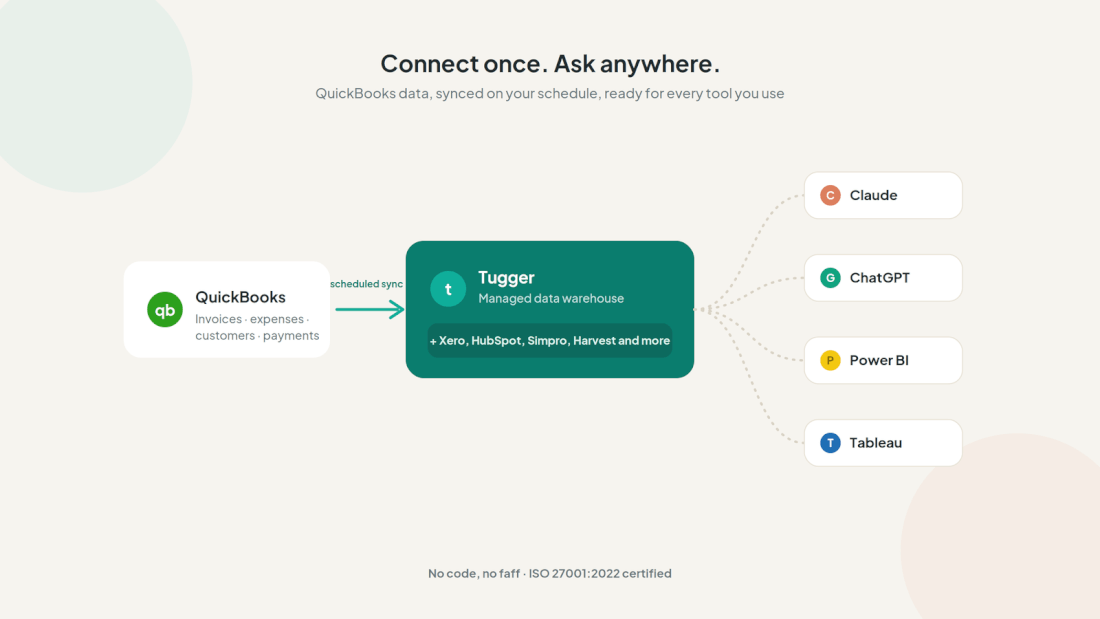
Tugger's QuickBooks connector works with UK QuickBooks Online companies. It syncs 35 tables from QuickBooks on a schedule into a managed data warehouse and exposes that warehouse to Claude through a read-only MCP server. Claude queries the warehouse, so nothing it does can touch your ledger, and the warehouse carries the rules for questions QuickBooks makes awkward, such as netting credit memos and refund receipts off invoiced revenue or separating VAT from ex-VAT totals.
Tugger runs a first sync and then refreshes on a schedule. You can see sync status and history in the Tugger dashboard.
In any new chat, open the connectors menu and switch Tugger on. Claude can now see the tables Tugger has synced from QuickBooks.
"What was our net revenue by month for the last twelve months, excluding VAT and after credit notes and refunds?"
Claude will identify the invoice, credit memo and refund tables, run the query and return the result. That question is a good first test precisely because it is one the official connector and a CSV export both tend to get wrong.
| Area | Tables |
|---|---|
| Sales | Invoices, estimates, payments, credit memos, refund receipts, reimbursable charges |
| Purchases | Bills, bill payments, purchase orders, purchases, vendor credits |
| Accounting | Chart of accounts, journal entries, budgets, classes, departments |
| Banking | Deposits, transfers, credit card payments |
| Tax | Tax codes, tax rates, tax agencies, tax payments |
| People | Customers, customer types, vendors, employees, time activities |
| Products and configuration | Items, payment terms, payment methods, currencies, exchange rates, company info |
Tugger's QuickBooks connector is for QuickBooks Online. QuickBooks Desktop was withdrawn from the UK in 2023 and is not supported.
| Intuit's Claude connector | Tugger | |
|---|---|---|
| Works with UK companies | Not currently | Yes |
| Best for | Lookups and actions in a chat | Reporting and analysis |
| Data source | QuickBooks API at the time of asking | Managed warehouse, synced on a schedule |
| Can change data in QuickBooks | Yes, including invoices and payment links | No, read-only |
| Other systems in the same question | No | Yes, HubSpot, Simpro, Harvest and 60+ others |
| Also feeds | Claude only | Claude, ChatGPT, Gemini, Power BI, Tableau |
| Hosting and certification | Intuit, US | UK-based, ISO 27001:2022 |
If Intuit opens the connector to the UK, the two will sit together well: the official connector for day-to-day lookups, Tugger for the reporting layer and for anything that combines QuickBooks with the rest of the business.
Connecting QuickBooks to Claude with Tugger takes no code and no faff, and it works in the UK today. Try Tugger free for 10 days or book a demo and we'll walk through it with your own QuickBooks data.
Claude does the analysis and explains the answer in plain terms. You stay in conversation instead of wrestling with report builders.
QuickBooks tells you the financial story. The full picture needs your other systems too. Tugger connects 50+ business tools, including Xero, HubSpot, Simpro, Harvest, Pipedrive, Shopify and Jira, into the same warehouse, so Claude can answer questions across all of them at once.
Tugger is ISO 27001:2022 certified. Your QuickBooks data is synced on a schedule into your own managed warehouse, and you control what's connected and what Claude can see. No data is sold, shared or used to train AI models.
Set up takes a few clicks, and the trial is free for 10 days. No code, no faff.
Shopify and Xero rarely agree. Three prompts that reconcile the gap, find refund and fee drag by product, and flag overdue customers.

Running several Xero files? Three prompts that give you consolidated group revenue, intercompany reconciliation and cash without the spreadsheet.

Xero’s own connector covers one organisation, read-only. Four alternatives cover write access, multi-entity and cross-system questions. Which one depends on what you’re asking.
Don't just take our word for it.
Working with the AI agent through Tugger, blending Simpro, Xero and my other systems together, I came up with a really detailed, factual investigation.
It’s helped me keep my finger on the pulse of each department without having to be down in the trenches to get that pulse.
One of our customers wants a monthly evaluation pack built from thousands of Simpro jobs. It used to take a full day. Now our data reaches Claude through Tugger and the pack comes back in ten minutes, exactly how they want it.
Batch invoicing and reporting used to eat hours of admin time each week, chasing details back and forth between Simpro and our spreadsheets. Now it runs on its own, and because Tugger guides the AI to the right figures, I can trust what comes out.